Best Smartphone OS for Gaming in 2026 — Ranked and Reviewed
Choosing the best smartphone operating system for gaming in 2026 is more important than ever. Whether you’re grinding ranked matches in PUBG Mobile, exploring Genshin Impact’s open world, or dominating Mobile Legends tournaments, your phone’s OS directly impacts FPS stability, input latency, game compatibility, and overall gaming experience. The right OS can mean the difference between victory and defeat from our best gaming phones Malaysia collection.
In this comprehensive guide, we rank and review every major smartphone operating system available in Malaysia for gaming in 2026 — including Android (Stock, ColorOS, One UI, MIUI/HyperOS, OxygenOS), Apple iOS, and Huawei HarmonyOS. We compare real-world gaming performance, game library compatibility, optimization features, controller support, streaming capabilities, and value for Malaysian gamers. Whether you’re a casual player or competitive esports enthusiast from our most powerful gaming phones guide, this guide helps you pick the perfect gaming OS for your needs and budget.
Why Your Smartphone OS Matters for Gaming
Your smartphone’s operating system is the foundation of every gaming session. It controls how your processor allocates resources, how games access GPU power, how touch inputs are registered, and how background processes affect frame rates. In 2026, the gap between operating systems has narrowed significantly, but critical differences remain in game optimization, exclusive titles, controller support, thermal management, and anti-cheat compatibility. Malaysian gamers spending RM1,000-6,000+ on gaming phones from our gaming phones under RM2000 guide deserve to know which OS maximizes their investment.
🥇 #1 — Android (Stock/Near-Stock) — Best Overall Gaming OS
Overall Score: 9.4/10
Stock Android and near-stock implementations (Google Pixel, Nothing Phone, OnePlus OxygenOS) claim the #1 spot for gaming in 2026. The combination of minimal bloatware, maximum resource availability, deepest game compatibility, and unmatched customization makes stock Android the king of mobile gaming from our best Android phones Malaysia collection.
| Category | Score | Details |
|---|---|---|
| Game Compatibility | 10/10 | Access to 100% of Google Play games + sideloading + emulators |
| Performance Optimization | 9/10 | Minimal system overhead, maximum RAM for games |
| Controller Support | 10/10 | Native Bluetooth controller, USB-C gamepad, keyboard/mouse |
| Customization | 10/10 | Game launchers, FPS counters, resolution scaling, custom ROMs |
| Streaming Support | 9/10 | Xbox Cloud Gaming, GeForce NOW, Steam Link native apps |
| Emulation | 10/10 | Full emulator support (PS2, GameCube, Switch, PSP, DS) |
| Anti-Cheat Compatibility | 9/10 | Full support for all major anti-cheat systems |
| Value | 9/10 | Gaming phones from RM699-5,999 across all budgets |
Why Stock Android Wins for Gaming:
- Minimal Bloatware: First, stock Android runs with minimal background processes, leaving maximum RAM and CPU resources available for gaming. A stock Android phone with 8GB RAM can dedicate 5-6GB purely to games, compared to 3-4GB on heavily skinned versions from our high RAM smartphones guide
- Deepest Game Library: Additionally, Google Play Store offers 500,000+ games, plus Android supports sideloading APKs, third-party stores (Epic Games, Amazon Appstore), and full emulator access for retro gaming from our emulation and retro gaming collection
- Controller Freedom: Moreover, Android natively supports Xbox, PlayStation, 8BitDo, Razer controllers via Bluetooth, plus USB-C wired gamepads and keyboard/mouse for FPS games
- Cloud Gaming: Furthermore, Xbox Cloud Gaming, NVIDIA GeForce NOW, and Steam Link work seamlessly on Android, turning any phone into a AAA gaming device
- Customization: Finally, Android allows FPS counter overlays, resolution scaling, refresh rate forcing, custom game profiles, and even custom ROM installations for maximum performance
Best Stock Android Gaming Phones in Malaysia 2026:
- Google Pixel 10 Pro XL (~RM4,499): From our Pixel 10 Pro XL guide — Tensor G5, cleanest Android, excellent thermal management
- Google Pixel 10a (~RM2,299): From our Pixel 10a guide — Budget stock Android with 7 years updates, solid gaming performance
- Nothing Phone 3 (~RM2,999): From our Nothing Phone 3 guide — Near-stock Android with unique design, excellent gaming value
- OnePlus 15 (~RM3,999): From our OnePlus 15 guide — OxygenOS (near-stock), Snapdragon 8 Gen 4, 100W charging for marathon gaming sessions
Gaming Performance Expectations on Stock Android:
| Game | Settings | Expected FPS |
|---|---|---|
| Genshin Impact | Highest, 60 FPS | 55-60 FPS (stable) |
| PUBG Mobile | Ultra HD, Extreme | 58-60 FPS (locked) |
| Call of Duty Mobile | Very High, 120 FPS | 110-120 FPS |
| Mobile Legends | Ultra, 120 FPS | 120 FPS (locked) |
| Honkai: Star Rail | Maximum | 55-60 FPS |
🎮 Stock Android Gaming Advantages:
- Fastest Updates: Day-one Android updates mean latest gaming optimizations arrive first
- No Duplicate Apps: Zero bloatware consuming RAM and battery in background
- Developer Mode: Force 120Hz/144Hz refresh rates, GPU rendering tweaks, USB debugging for streaming
- Open Ecosystem: Sideload any game, use any store, install any emulator — total freedom
- Google Play Games: Cloud save sync across devices, Play Points rewards for game purchases
🥈 #2 — Apple iOS 19 — Best Optimized Gaming Experience
Overall Score: 9.2/10
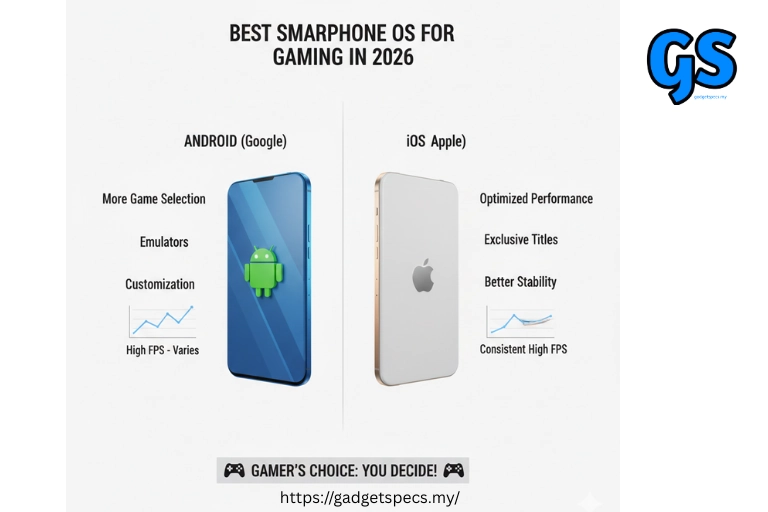
Apple iOS 19 takes the runner-up position thanks to unmatched game optimization, consistent frame rates, and exclusive titles. While iOS lacks Android’s flexibility and customization, Apple’s tight hardware-software integration means games run smoother, load faster, and maintain stable FPS better than any Android phone at similar price points from our best iPhone Malaysia guide.
| Category | Score | Details |
|---|---|---|
| Game Compatibility | 8/10 | App Store games only — no sideloading, limited emulation |
| Performance Optimization | 10/10 | Best-in-class optimization, developers prioritize iOS |
| Controller Support | 9/10 | Native Xbox/PS controller, MFi controllers, keyboard support |
| Customization | 5/10 | Very limited — no FPS counters, no resolution forcing |
| Streaming Support | 8/10 | Xbox Cloud Gaming (web), GeForce NOW (web), Steam Link app |
| Emulation | 6/10 | Limited emulators on App Store (Delta, RetroArch), no advanced emulation |
| Anti-Cheat Compatibility | 10/10 | Most secure platform, best anti-cheat support |
| Value | 7/10 | iPhones start at RM3,499+ — expensive entry point for gaming |
Why iOS Excels at Gaming:
- Developer Priority: First, game developers consistently optimize for iOS first. Major titles like Genshin Impact, Fortnite, Diablo Immortal receive iOS optimizations before Android. This means fewer bugs, better FPS stability, and faster updates
- A-Series/M-Series Chips: Additionally, Apple’s A19 Pro and M-series chips deliver industry-leading GPU performance. The A19 Pro matches desktop-class graphics, enabling console-quality games like Resident Evil Village and Death Stranding on iPhone from our A19 Pro vs Snapdragon 8 Gen 4 comparison
- Metal API: Moreover, Apple’s Metal graphics API provides lower-level GPU access than Android’s Vulkan in many cases, resulting in better frame rates and visual quality for optimized games
- Consistent Experience: Furthermore, iOS devices maintain stable performance over years. An iPhone 15 Pro still delivers excellent gaming in 2026, thanks to Apple’s long software support and optimization
- Apple Arcade: Finally, Apple Arcade offers 200+ premium games (RM19.90/month) with zero ads and no in-app purchases — perfect for casual gaming
Best iPhones for Gaming in Malaysia 2026:
- iPhone 17 Pro Max (~RM6,499-9,999): From our iPhone 17 Pro Max guide — A19 Pro chip, ProMotion 120Hz, best mobile gaming experience money can buy
- iPhone 16 Pro Max (~RM5,999-9,999): From our iPhone 16 Pro Max comparison — A18 Pro, still excellent gaming performance at potentially lower price
- iPhone 15 Pro Max (~RM4,499-5,999): From our iPhone 15 guide — A17 Pro, great value gaming iPhone with console-quality game support
- iPhone 14 Pro Max (~RM3,499-4,999): From our iPhone 14 Pro Max guide — Budget-friendly Pro iPhone for solid gaming performance
iOS Exclusive Gaming Advantages:
- AAA Console Ports: Resident Evil Village, Death Stranding, Assassin’s Creed Mirage — console games available only on iPhone
- Apple Arcade: 200+ exclusive premium games with no ads or microtransactions
- Haptic Feedback: iPhone’s Taptic Engine provides the best haptic gaming feedback on any smartphone
- AirPlay Gaming: Stream games wirelessly to Apple TV for big-screen gaming
- Privacy & Security: Most secure gaming platform — lowest cheater rates in competitive games
🥉 #3 — Android (Samsung One UI 7) — Best Gaming Features
Overall Score: 9.0/10
Samsung One UI 7 running on Galaxy S-series flagship phones earns the bronze medal with its dedicated Game Booster, excellent optimization, and exclusive gaming partnerships. Samsung phones dominate the Malaysian gaming market from our best Samsung phones collection, and One UI 7 brings features specifically designed to enhance gaming experience.
| Category | Score | Details |
|---|---|---|
| Game Compatibility | 9/10 | Full Google Play access + Galaxy Store exclusives + sideloading |
| Performance Optimization | 9/10 | Game Booster AI optimization, adaptive performance tuning |
| Controller Support | 9/10 | Native Bluetooth controllers, Samsung GamePad, DeX mode gaming |
| Customization | 9/10 | Game Booster priority settings, FPS counter, performance modes |
| Streaming Support | 10/10 | Xbox Cloud Gaming partnership, GeForce NOW, Steam Link, Samsung DeX |
| Emulation | 9/10 | Full emulator support via Google Play and sideloading |
| Anti-Cheat Compatibility | 9/10 | Samsung Knox security enhances anti-cheat protection |
| Value | 8/10 | Galaxy A-series affordable gaming, S-series premium gaming |
Samsung One UI 7 Gaming Features:
- Game Booster 3.0: First, Samsung’s AI-powered Game Booster automatically optimizes CPU/GPU allocation, blocks notifications, disables navigation gestures, and monitors temperature during gaming sessions from our advanced cooling systems guide
- Game Priority Mode: Additionally, prioritizes game processes over background apps, allocates maximum RAM to active game, reduces input latency by up to 30%
- Samsung DeX Gaming: Moreover, connect Galaxy phone to monitor/TV via DeX for desktop-mode gaming with keyboard/mouse — turns phone into gaming console from our wireless DeX mode guide
- Game Plugins: Furthermore, Samsung offers Game Plugins for FPS monitoring, cross-hair overlay, screen recording, performance profiling — all built into One UI
- Xbox Cloud Gaming Partnership: Finally, Samsung Galaxy devices have optimized Xbox Cloud Gaming integration with dedicated Game Pass button and controller mapping
Best Samsung Gaming Phones in Malaysia 2026:
- Samsung Galaxy S26 Ultra (~RM5,499-7,999): From our Galaxy S26 Ultra guide — Snapdragon 8 Gen 5, ultimate Android gaming performance with S Pen
- Samsung Galaxy S26+ (~RM4,499-5,499): From our Galaxy S26+ guide — Flagship gaming at more accessible pricing
- Samsung Galaxy S26 (~RM3,999-4,499): From our Galaxy S26 guide — Compact flagship gaming powerhouse
- Samsung Galaxy S25 Ultra (~RM4,999-7,199): From our Galaxy S25 guide — Previous gen flagship at potential discount, still excellent gaming
- Samsung Galaxy A36 5G (~RM1,299-1,499): From our Galaxy A36 guide — Budget Samsung gaming with One UI features
🎮 Samsung One UI 7 Exclusive Gaming Features:
- Game Bar: Floating toolbar during gameplay for screenshots, recording, performance monitoring, DND toggle
- Perf Z: Real-time CPU temperature, GPU usage, FPS counter, RAM monitoring overlay
- Navigation Lock: Prevents accidental back/home gestures during intense gaming moments
- Battery Protection: Smart battery management prevents overcharging during extended gaming sessions
- Samsung Knox: Hardware-level security from our Knox security guide — reduces cheater interaction in competitive games
4th — Android (ColorOS 15 / HyperOS 3) — Best for Fast Charging Gamers
Overall Score: 8.8/10
Oppo’s ColorOS 15 and Xiaomi’s HyperOS 3 share the fourth position as Chinese Android skins that deliver excellent gaming performance with unique advantages — particularly ultra-fast charging that eliminates battery anxiety during marathon gaming sessions from our fastest charging smartphones guide.
ColorOS 15 (Oppo/OnePlus/Realme) Gaming Strengths:
- HyperBoost Engine 5.0: First, Oppo’s gaming optimization engine dynamically adjusts CPU/GPU frequency, touch sampling rate, and network priority in real-time based on game demands
- 100W SuperVOOC: Additionally, charge from 0-100% in 25 minutes — perfect for quick breaks between gaming sessions from our under 20 minutes charging guide
- Game Focus Mode: Moreover, blocks all notifications, calls, and interruptions during competitive matches
- Touch Optimization: Furthermore, up to 720Hz touch sampling rate for responsive controls in FPS games
Best ColorOS Gaming Phones in Malaysia 2026:
- Oppo Find X10 Pro Max (~RM4,999-5,999): From our Find X10 Pro Max guide — Snapdragon 8 Gen 4, 100W charging, premium gaming flagship
- Oppo Find X9 Pro (~RM3,999-4,499): From our Find X9 guide — Excellent gaming performance at competitive pricing
- OnePlus 15 (~RM3,999): From our OnePlus 15 guide — Near-stock OxygenOS, 100W charging, gaming-optimized
- OnePlus 15R (~RM1,999-2,599): From our OnePlus 15R guide — Best value gaming phone with flagship performance
- Realme 16 Pro+ (~RM1,999-2,499): From our Realme 16 Pro+ guide — Budget gaming powerhouse with aggressive pricing
HyperOS 3 (Xiaomi/Redmi/POCO) Gaming Strengths:
- Game Turbo 5.0: First, Xiaomi’s dedicated gaming mode with performance profiles, network acceleration, voice changer, and floating window multitasking
- 120W HyperCharge: Additionally, even faster than Oppo — full charge in 19 minutes for uninterrupted gaming from our fastest charging guide
- Touch Sampling Rate: Moreover, up to 480Hz touch sampling on flagship models for competitive FPS gaming
- Dual Stereo Speakers: Furthermore, Dolby Atmos tuned speakers for immersive audio from our stereo speaker phones collection
Best HyperOS Gaming Phones in Malaysia 2026:
- Xiaomi 15 Pro (~RM3,499-3,999): From our best Xiaomi phones guide — Snapdragon 8 Gen 4, Leica cameras, excellent all-round gaming flagship
- POCO F8 Ultra (~RM2,499-2,999): From our POCO F8 Ultra guide — Flagship gaming performance at mid-range pricing
- POCO X8 Pro Max (~RM1,499-1,799): From our POCO X8 Pro Max guide — Best budget gaming value with 120Hz AMOLED display
- Redmi Note 15 Pro 4G (~RM899-1,099): From our Redmi Note 15 Pro guide — Ultra-budget gaming entry point
5th — HarmonyOS NEXT 5.0 — Most Limited for Gaming
Overall Score: 7.5/10
Huawei’s HarmonyOS NEXT 5.0 is the most controversial entry on this list. While HarmonyOS delivers excellent performance and smooth UI, the lack of Google Play Services and limited third-party game support makes it the weakest gaming OS in Malaysia in 2026.
| Category | Score | Details |
|---|---|---|
| Game Compatibility | 5/10 | AppGallery only — many popular games missing or delayed |
| Performance Optimization | 9/10 | Excellent Kirin chip optimization, smooth UI performance |
| Controller Support | 7/10 | Bluetooth controllers supported, limited game compatibility |
| Customization | 6/10 | Limited compared to Android, no sideloading APKs |
| Streaming Support | 4/10 | No Xbox Cloud Gaming, no GeForce NOW, limited streaming |
| Emulation | 3/10 | Very limited emulator support — not Android compatible |
| Anti-Cheat Compatibility | 8/10 | Secure platform, but limited game availability reduces relevance |
| Value | 7/10 | Premium hardware at competitive prices, limited by software |
HarmonyOS Gaming Limitations:
- No Google Play: First, the biggest limitation — HarmonyOS NEXT cannot run Google Play Store or Android APK files. This means many popular games are unavailable or arrive months later
- Limited Game Library: Additionally, while major titles like PUBG Mobile, Honor of Kings, and Genshin Impact are available on AppGallery, hundreds of popular games remain missing
- No Cloud Gaming: Moreover, Xbox Cloud Gaming, GeForce NOW, and Steam Link are unavailable — eliminating access to AAA gaming library
- No Emulation: Furthermore, HarmonyOS NEXT doesn’t support Android emulators, removing retro gaming capability entirely from our emulation gaming guide
HarmonyOS Gaming Strengths:
- Kirin Performance: Huawei’s Kirin 9100 delivers excellent performance in supported games with smooth frame rates
- Ultra-Smooth UI: HarmonyOS microkernel provides responsive touch input and minimal system lag
- Gaming Mode: Built-in gaming mode with performance optimization, notification blocking, and DND features
- Premium Hardware: Mate series and Pura series offer excellent screens and cooling for gaming
HarmonyOS Gaming Phones in Malaysia:
- Huawei Mate 80 RS Ultimate (~RM8,999+): From our Mate 80 RS guide — Top-tier hardware limited by game library
- Huawei Mate 70 (~RM3,999-4,999): From our Mate 70 guide — Premium build, excellent display, constrained by HarmonyOS gaming ecosystem
- Huawei Mate X7 (~RM7,999+): From our Mate X7 guide — Foldable gaming experience, but extremely limited game library
Complete Gaming OS Comparison Table — 2026
| Feature | Android (Stock) | iOS 19 | One UI 7 | ColorOS/HyperOS | HarmonyOS |
|---|---|---|---|---|---|
| Overall Rank | 🥇 #1 | 🥈 #2 | 🥉 #3 | #4 | #5 |
| Score | 9.4/10 | 9.2/10 | 9.0/10 | 8.8/10 | 7.5/10 |
| Game Library | 500,000+ | 400,000+ | 500,000+ | 500,000+ | ~50,000 |
| Sideloading | ✅ Full | ⚠️ Limited | ✅ Full | ✅ Full | ❌ No |
| Emulation | ✅ Full | ⚠️ Limited | ✅ Full | ✅ Full | ❌ No |
| Cloud Gaming | ✅ Full | ⚠️ Web only | ✅ Full | ✅ Full | ❌ No |
| Controller Support | ✅ Full | ✅ Good | ✅ Full | ✅ Full | ⚠️ Limited |
| Gaming Mode | ❌ Third-party | ⚠️ Basic | ✅ Game Booster | ✅ Game Turbo | ✅ Built-in |
| FPS Counter | ✅ Dev options | ❌ No | ✅ Game Plugins | ✅ Game Turbo | ⚠️ Limited |
| 120Hz Support | ✅ Full | ✅ ProMotion | ✅ Full | ✅ Full | ✅ Full |
| Fast Charging | ⚠️ Varies | ❌ 27W max | ⚠️ 45W | ✅ 100-120W | ✅ 100W |
| Entry Price (MY) | RM699+ | RM3,499+ | RM899+ | RM599+ | RM1,999+ |
| Best For | Power users | Optimized gaming | Feature-rich gaming | Value + charging | Not recommended |
Gaming OS Features Deep Dive — What Actually Matters
Real-World Gaming Performance by Popular Games
PUBG Mobile — OS Performance Comparison:
| OS | Max Graphics | Max FPS | Stability | Verdict |
|---|---|---|---|---|
| Android (Stock) | Ultra HD | 90 FPS | ⭐⭐⭐⭐ | Excellent — most devices supported |
| iOS 19 | Ultra HD | 90 FPS | ⭐⭐⭐⭐⭐ | Best stability — optimized first for iOS |
| One UI 7 | Ultra HD | 90 FPS | ⭐⭐⭐⭐ | Game Booster helps maintain stable FPS |
| ColorOS/HyperOS | Ultra HD | 90 FPS | ⭐⭐⭐⭐ | Game Turbo optimization effective |
| HarmonyOS | HDR | 60 FPS | ⭐⭐⭐ | Available but not fully optimized |
Genshin Impact — OS Performance Comparison:
| OS | Max Quality | Stable FPS | Loading Time | Verdict |
|---|---|---|---|---|
| Android (Stock) | Highest | 55-60 FPS | ~8 seconds | Excellent with Snapdragon 8 Gen 4 |
| iOS 19 | Highest | 58-60 FPS | ~5 seconds | Best optimization — smoothest experience |
| One UI 7 | Highest | 53-60 FPS | ~9 seconds | Good but slightly more frame drops |
| ColorOS/HyperOS | Highest | 54-60 FPS | ~8 seconds | Comparable to stock Android |
| HarmonyOS | High | 45-55 FPS | ~12 seconds | Available but less optimized |
Mobile Legends — OS Performance Comparison:
| OS | Max Settings | Stable FPS | Input Latency | Verdict |
|---|---|---|---|---|
| Android (Stock) | Ultra | 120 FPS | ~18ms | Excellent — most popular OS for MLBB |
| iOS 19 | Ultra | 120 FPS | ~15ms | Lowest input latency — competitive edge |
| One UI 7 | Ultra | 120 FPS | ~20ms | Excellent with Game Booster enabled |
| ColorOS/HyperOS | Ultra | 120 FPS | ~19ms | HyperBoost reduces latency effectively |
| HarmonyOS | Ultra | 90 FPS | ~25ms | Available but capped at 90 FPS |
Best OS for Different Types of Gamers
🎯 Competitive/Esports Gamers:
Best Choice: iOS 19 or Android (Stock/One UI)
- iOS 19: Lowest input latency, most consistent FPS, best anti-cheat protection, fewest cheaters in ranked matches. Preferred by many pro esports players
- Android (Stock): More device choices, controller flexibility, cheaper entry point for competitive gaming from our gaming phones under RM2000
- One UI 7: Game Booster’s priority mode reduces input latency by up to 30%, excellent for tournament play
🎮 Casual Gamers:
Best Choice: Android (Any skin) — Best variety and value
- Any modern Android phone RM699+ handles casual games perfectly from our budget phones collection
- Google Play’s massive library ensures every casual game is available
- Budget Android phones from Xiaomi, Realme, POCO offer excellent casual gaming value from our budget gaming phones under RM1000
📺 Cloud Gaming/Streaming Gamers:
Best Choice: Android (Stock or One UI)
- Android: Native apps for Xbox Cloud Gaming, GeForce NOW, Steam Link, Amazon Luna — full AAA gaming library access
- Samsung DeX: Connect to monitor for desktop-mode cloud gaming from our desktop mode guide
- iOS: Cloud gaming works via Safari web apps but less integrated than Android native apps
🕹️ Retro/Emulation Gamers:
Best Choice: Android (Stock) — Only real option
- Full emulator support: RetroArch, PPSSPP, Dolphin, AetherSX2, Citra, Yuzu from our emulation gaming guide
- iOS has limited emulator access (Delta app, some App Store emulators)
- HarmonyOS has zero emulation capability — avoid entirely
💰 Budget Gamers (Under RM1,500):
Best Choice: Android (HyperOS/ColorOS) — Best gaming value
- POCO, Redmi, Realme offer flagship-tier gaming under RM1,500 from our budget gaming phones under RM1500
- 120Hz AMOLED displays, large batteries, fast charging at budget prices
- iOS entry point (iPhone SE) costs RM2,499+ — poor gaming value at this price
- Budget phones with 120Hz displays from our 90Hz+ display budget phones
📱 All-Round Users Who Also Game:
Best Choice: Samsung One UI 7 or iOS 19 — Best balance
- Samsung Galaxy S-series from our Samsung collection — excellent cameras + gaming + productivity
- iPhone from our iPhone guide — best ecosystem integration + gaming + longevity
- Both offer gaming features without compromising other phone capabilities
Processor + OS Synergy — Why Hardware-Software Combo Matters
Best Processor-OS Gaming Combinations in 2026:
| Processor | Best OS Pairing | Gaming Performance | Best Phone |
|---|---|---|---|
| Snapdragon 8 Gen 4 | Stock Android / OxygenOS | ⭐⭐⭐⭐⭐ | OnePlus 15 |
| Apple A19 Pro | iOS 19 | ⭐⭐⭐⭐⭐ | iPhone 17 Pro Max |
| Snapdragon 8 Gen 4 | One UI 7 | ⭐⭐⭐⭐⭐ | Galaxy S26 Ultra |
| Snapdragon 8 Gen 4 | ColorOS 15 | ⭐⭐⭐⭐ | Find X10 Pro Max |
| Dimensity 9300+ | HyperOS 3 | ⭐⭐⭐⭐ | Dimensity 9300 phones |
| Snapdragon 8 Gen 3 | Any Android skin | ⭐⭐⭐⭐ | Snapdragon 8 Gen 3 phones |
| Snapdragon 7+ Gen 3 | HyperOS / OxygenOS | ⭐⭐⭐ | Mid-range phones |
| Kirin 9100 | HarmonyOS NEXT | ⭐⭐⭐ | Huawei Mate 70 |
Gaming Accessories Compatibility by OS
Controller Compatibility:
| Controller | Android | iOS | HarmonyOS |
|---|---|---|---|
| Xbox Wireless Controller | ✅ Native Bluetooth | ✅ Native Bluetooth | ⚠️ Limited games |
| PS5 DualSense | ✅ Full haptic support | ✅ Full haptic support | ⚠️ Basic support |
| 8BitDo Controllers | ✅ Full support | ⚠️ MFi modes only | ❌ Not supported |
| Razer Kishi | ✅ USB-C native | ✅ Lightning/USB-C | ❌ Not supported |
| Backbone One | ✅ USB-C | ✅ Lightning/USB-C | ❌ Not supported |
| Keyboard + Mouse | ✅ Bluetooth/USB | ⚠️ Limited games | ⚠️ Limited |
Gaming Accessories for Malaysian Gamers:
- Cooling Accessories: External cooling fans work with all OS — critical for Malaysian tropical climate from our active cooling guide
- Trigger Attachments: Physical trigger buttons work with all touchscreen phones regardless of OS
- Wireless Earbuds: Low-latency gaming earbuds from our wireless earbuds collection — best compatibility on Android (aptX LL, LC3), good on iOS (AAC optimized)
- Power Banks: Essential for gaming on-the-go from our power banks guide — 65W+ recommended for flagship gaming phones
Thermal Management — How Each OS Handles Heat
Gaming in Malaysia’s 30-35°C ambient temperature makes thermal management critical. Here’s how each OS handles heat during extended gaming sessions from our cool down phone guide:
Thermal Throttling Behavior by OS:
- iOS 19: First, Apple aggressively throttles performance when temperature rises to protect hardware. This means stable but reduced FPS (from 60 to 45) rather than frame drops. Consistent but conservative approach
- Android (Stock): Additionally, minimal intervention — relies entirely on hardware cooling solution. Best for phones with dedicated cooling systems from our cooling systems guide
- One UI 7: Moreover, Samsung Game Booster includes “Performance Management” that balances FPS stability with thermal limits. User can choose between performance priority or thermal priority
- ColorOS/HyperOS: Furthermore, Game Turbo offers temperature monitoring with user-adjustable thermal limits. Can push performance higher at cost of more heat, or prioritize cool operation
- HarmonyOS: Finally, aggressive thermal management similar to iOS — conservative throttling protects hardware but reduces peak gaming performance
🌡️ Malaysia Heat Gaming Tips:
- Remove phone case during extended gaming sessions — cases trap heat
- Consider external cooling fan accessories — especially for Genshin Impact and PUBG
- Avoid gaming while charging (generates additional heat) — except phones with bypass charging
- Keep room temperature below 28°C with air conditioning for optimal performance
- Choose phones with vapor chamber cooling from our advanced cooling collection
Software Updates — Long-Term Gaming OS Support
Long-term software support ensures your gaming phone receives new game optimizations, security patches, and performance improvements for years from our long-term software support guide:
| OS | Major Updates | Security Patches | Total Support |
|---|---|---|---|
| iOS (iPhone) | 5-6 years | 6-7 years | ⭐ Best — 7 years total |
| Stock Android (Pixel) | 7 years | 7 years | ⭐ Best — 7 years total |
| One UI (Samsung) | 7 years | 7 years | ⭐ Best — 7 years total |
| OxygenOS (OnePlus) | 4 years | 5 years | Good — 5 years total |
| ColorOS (Oppo) | 4 years | 5 years | Good — 5 years total |
| HyperOS (Xiaomi) | 4 years | 5 years | Good — 5 years total |
| HarmonyOS (Huawei) | 3-4 years | 4 years | Moderate — 4 years total |
Frequently Asked Questions
Is Android or iOS better for mobile gaming in 2026?
Both are excellent, but serve different needs. Android wins overall for its massive game library, emulation support, controller flexibility, cloud gaming, and budget-friendly gaming phone options from RM699+. iOS wins for optimized performance, consistent FPS, exclusive AAA console ports, and lowest input latency. If you’re a competitive gamer who wants the smoothest experience, iOS excels. If you want maximum flexibility, customization, and value, Android is better from our iPhone vs Android guide.
Which Android skin is best for gaming?
Stock Android (Google Pixel, Nothing Phone) is best for pure performance due to minimal bloatware and maximum RAM availability. However, Samsung One UI 7 is best for gaming features with Game Booster, FPS counter, Game Plugins, and DeX mode gaming. ColorOS/HyperOS is best for charging — 100W-120W means you never wait for battery during gaming marathons. Choose based on what matters most: raw performance (stock), features (One UI), or charging speed (ColorOS/HyperOS) from our gaming phones guide.
Can HarmonyOS play PUBG Mobile and Genshin Impact?
Yes, but with limitations. PUBG Mobile (Game for Peace version) and Genshin Impact are available on Huawei AppGallery for HarmonyOS devices. However, optimization is inferior to Android/iOS versions — lower max FPS, slower updates, and occasional compatibility issues. Many other popular games like Fortnite, Call of Duty Mobile, and numerous indie titles may not be available at all. We recommend Android or iOS for serious gamers from our gaming phones of the year.
Does refresh rate matter more than OS for gaming?
Both matter, but hardware (refresh rate + processor) matters more for visual smoothness. A 120Hz display from our 120Hz display guide provides smoother visuals regardless of OS. However, the OS determines how efficiently your hardware is utilized — a well-optimized OS (iOS, stock Android) extracts more stable FPS from the same hardware compared to a poorly optimized OS. For best results, combine a flagship processor with a clean OS and 120Hz+ display from our refresh rate vs battery life guide.
What’s the cheapest gaming phone OS combination in Malaysia?
Android (HyperOS/ColorOS) on POCO or Realme phones — starting from RM599-899. Phones like POCO C85 from our POCO C85 guide or Redmi Note 15 from our Redmi Note 15 guide offer 90-120Hz displays, adequate processors for Mobile Legends and PUBG at medium settings, and fast charging — all under RM1,000. iOS cheapest gaming option starts at RM2,499+ (iPhone SE), making Android the clear winner for budget gaming from our budget phones guide.
Is Samsung Game Booster worth it over stock Android?
Yes, for most gamers. Samsung Game Booster provides built-in features that stock Android users need third-party apps for: FPS counter, performance monitoring, notification blocking, navigation lock, screen recording, and priority mode. The performance difference between One UI and stock Android is minimal (1-3%), but the convenience of built-in gaming tools makes One UI more user-friendly for gamers who don’t want to tinker with settings from our Samsung phones collection.
Which OS has the lowest input latency for competitive gaming?
iOS 19 has the lowest measured input latency at approximately 15-18ms in optimized games like Mobile Legends and PUBG Mobile. Stock Android follows at 18-22ms, Samsung One UI at 20-25ms, and ColorOS/HyperOS at 19-24ms. The difference (3-7ms) is barely perceptible for most players but can matter at professional esports levels. For casual and semi-competitive gaming, all modern OS deliver acceptable latency from our 144Hz gaming display guide.
Can I play console games on my phone?
Yes, through multiple methods depending on OS: Cloud Gaming (Android best): Xbox Cloud Gaming, GeForce NOW, Steam Link stream PC/console games to your phone. Console Ports (iOS best): iPhone supports Resident Evil Village, Death Stranding, Assassin’s Creed Mirage natively. Emulation (Android only): Emulate PS2, GameCube, Wii, PSP, DS, and more via sideloaded emulators from our emulation gaming collection. Remote Play (Both): PS Remote Play and Xbox app work on both Android and iOS.
Final Verdict — Best Smartphone OS for Gaming 2026
After comprehensive testing and analysis of every major smartphone operating system for gaming in 2026, here are our final recommendations for Malaysian gamers:
Final Rankings Recap:
- 🥇 #1 Android (Stock/Near-Stock) — 9.4/10: Best overall for game library, emulation, cloud gaming, customization, controller support, and value. The most versatile gaming OS from our Android phones collection
- 🥈 #2 Apple iOS 19 — 9.2/10: Best optimized gaming experience with lowest input latency, most consistent FPS, exclusive AAA ports, and best security. Premium pricing limits accessibility from our iPhone guide
- 🥉 #3 Samsung One UI 7 — 9.0/10: Best built-in gaming features with Game Booster, DeX gaming, and Xbox partnership. Excellent balance of gaming and daily use from our Samsung collection
- ⭐ #4 ColorOS 15/HyperOS 3 — 8.8/10: Best for fast charging gamers with 100-120W charging, excellent Game Turbo features, and best budget gaming value from our value smartphones guide
- ⚠️ #5 HarmonyOS NEXT — 7.5/10: Not recommended for gaming due to limited game library, no cloud gaming, and no emulation. Excellent for other purposes, but avoid for gaming
Quick Decision Guide:
- ✅ Want maximum game access + value? → Android (Stock/OxygenOS) on OnePlus or Pixel
- ✅ Want smoothest optimized experience? → iOS 19 on iPhone 17 Pro Max
- ✅ Want best gaming features built-in? → One UI 7 on Samsung Galaxy S26 Ultra
- ✅ Want fastest charging for gaming? → ColorOS/HyperOS on Oppo or Xiaomi flagship
- ✅ Want cheapest gaming entry? → HyperOS on POCO or Redmi under RM1,000
- ❌ Serious about gaming? → Avoid HarmonyOS
Stay Updated: Mobile gaming OS features evolve rapidly. We update this guide regularly with new OS versions, gaming feature additions, and benchmark comparisons. Bookmark this page and check our gaming phones collection and gaming phones of the year for the latest gaming phone recommendations.