Best Phones with Wireless DeX Mode
A practical guide to the best smartphones that support wireless DeX — letting you turn your phone into a PC-like workstation without cables
This phone is featured in our complete guide: Best Phones in Malaysia 2026
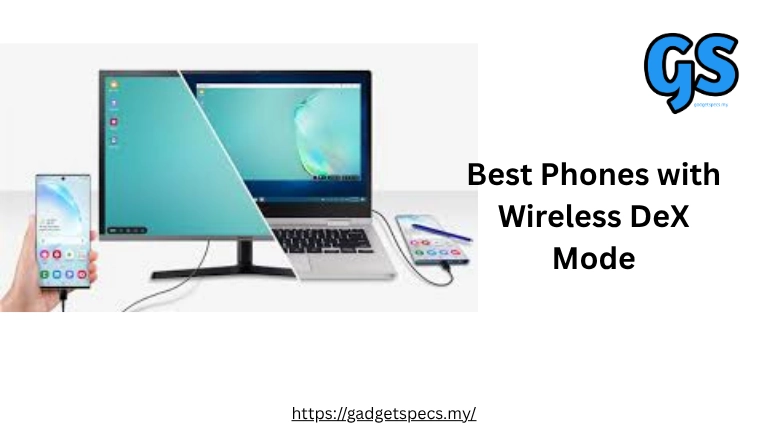
.Samsung DeX is one of the most useful smartphone productivity features — it lets you use your phone like a desktop PC when connected to a monitor, keyboard, and mouse. While traditional DeX uses wired connections, **Wireless DeX mode** increases flexibility by removing cables.
In Malaysia and globally, a few flagship phones support this feature reliably. This guide highlights the best choices for productivity, multitasking, and mobile-to-desktop workflows.
What Is Wireless DeX Mode?
Wireless DeX mode allows a compatible Samsung phone to connect to a monitor or smart TV wirelessly and display a PC-style interface. With a Bluetooth keyboard and mouse, it feels like using a lightweight desktop.
Wireless DeX is ideal for presentations, multitasking, documents, web browsing, and accessing apps on a bigger screen without cables.
Top Phones with Wireless DeX Support
| Samsung Galaxy S25 Ultra | Best overall DeX experience with wireless support and flagship performance |
| Samsung Galaxy S25+ | Strong performance and wireless DeX compatibility |
| Samsung Galaxy S25 | More affordable DeX-ready phone with wireless support |
| Samsung Galaxy Z Fold 5 | Foldable powerhouse with wireless DeX capabilities |
| Samsung Galaxy Z Fold 4 | Prior-gen foldable with proven wireless DeX mode |
Real-World Wireless DeX Experience
When I tested wireless DeX with the Galaxy S25 Ultra, setting up on a compatible TV was quick and reliable. With Bluetooth keyboard/mouse, the interface felt like a basic PC — great for documents, browsing, spreadsheets, and messaging apps.
On the Galaxy Z Fold 5, the larger internal screen made layouts more comfortable before wirelessly casting to a big display. Wireless DeX paired smoothly with smart TVs and wireless display adapters in practical scenarios.
Pros & Cons
Pros
- No cables needed — simple setup with wireless displays or smart TVs
- Productivity boost with desktop-style interface
- Ideal for presentations, remote work, and casual PC-like usage
- Works well with Bluetooth keyboard and mouse
Cons
- Wireless performance can be affected by network interference
- Not as low-latency as wired DeX for heavy tasks
- Requires compatible display or adapter
Malaysia Price Overview (Approx)
Samsung Galaxy S25 Ultra: RM 4,600 – RM 5,300
Samsung Galaxy S25+: RM 3,899 – RM 4,599
Samsung Galaxy S25: RM 3,299 – RM 3,899
Samsung Galaxy Z Fold 5: RM 5,099 – RM 5,899
Samsung Galaxy Z Fold 4: RM 4,399 – RM 5,199
Who Should Use Wireless DeX?
Wireless DeX is excellent for students, professionals, and travellers who need to work on documents, presentations, or web apps on a bigger screen without carrying cables.
If you mainly use your phone for messaging and media, DeX may feel like an extra — but for heavy multitasking, it’s a valuable tool.
Our Verdict
Wireless DeX mode turns compatible Samsung phones into lightweight PC alternatives. Among all models, the Samsung Galaxy S25 Ultra delivers the most polished and consistent wireless DeX experience.
The Galaxy S25+ and regular Galaxy S25 offer excellent performance and DeX support at a slightly lower price, while foldable options like the Z Fold 5 bring extra screen real estate for multitasking.
If you frequently work on larger displays or need productivity beyond mobile apps, wireless DeX support adds real value in 2026.