How to Improve Gaming Performance in Malaysia
Introduction
Many gamers in Malaysia face lag, frame drops, and slow gameplay. These problems happen on both budget phones and flagship phones. Games like PUBG Mobile, MLBB, Free Fire, and CODM need smooth performance to play well.
However, you can improve gaming performance fast. You only need to follow a few simple steps. These tips work on Samsung, Xiaomi, iPhone, OPPO, Vivo, Realme, Tecno, Infinix, and all gaming phones in Malaysia.
Turn On Gaming Mode
Almost every phone in Malaysia has a gaming mode. It boosts CPU, GPU, and RAM.
Brand names:
- Samsung – Game Booster
- Xiaomi – Game Turbo
- Realme / OPPO / Vivo – Game Space
- Infinix / Tecno – Game Mode
- iPhone – Performance Mode (iOS 17+)
Gaming mode reduces background tasks. As a result, you get smoother gameplay.
Close Background Apps
Background apps use RAM. Because of this, games lag.
Before playing:
- Close all apps
- Clear recent apps
- Disable floating apps
- Disable background sync
This step gives your game more free RAM.
Lower Graphics for Better FPS
High graphics look good. But they cause frame drops on many Malaysian phones.
So lower:
- Shadow
- Anti-aliasing
- Effects
- Resolution
Then set FPS to High or Ultra.
You will get smoother play.
Use a Stable Internet Connection
Weak Wi-Fi or mobile data causes lag.
Try these:
- Play near your router
- Use 5GHz Wi-Fi
- Turn on Mobile Data Boost
- Avoid crowded networks
- Disable VPN
A stable connection improves online gameplay a lot.
Turn On “Performance Mode”
Some phones include battery-saving mode by default. It reduces gaming power.
So turn on:
- High Performance Mode
- Enhanced Processing
- Performance Profile
This makes the CPU run at full speed.
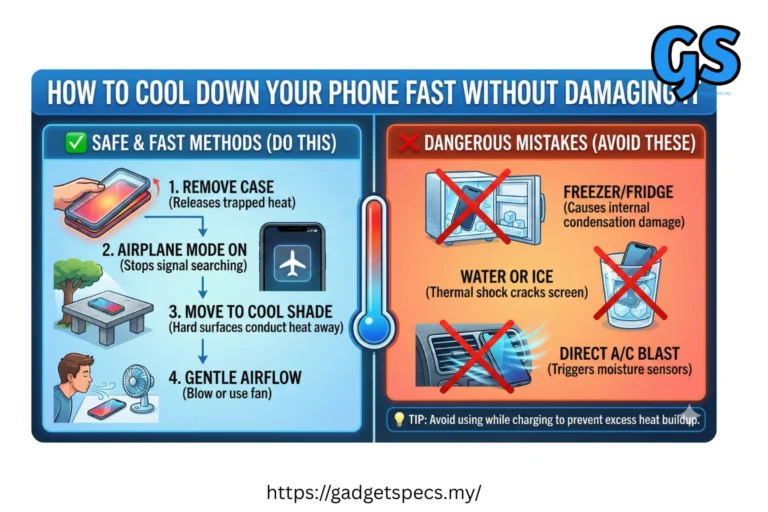
Keep Your Phone Cool
Heat kills FPS. When your phone gets hot, performance drops.
To reduce heat:
- Remove case while gaming
- Play in a cool room
- Reduce brightness
- Avoid charging while gaming
A cooler phone is always faster.
Delete Junk & Clear Storage
Low storage slows down games.
Free space by:
- Clearing cache
- Deleting duplicate photos
- Removing old apps
- Cleaning WhatsApp files
More storage = Better speed.
Update Your Game & Phone
Updates fix bugs.
Always update:
- Your game
- GPU drivers
- System software
After updates, games often run smoother.
Enable Developer Options (Android)
For advanced players:
- Go to Settings
- Tap About Phone
- Tap Build Number 7 times
- Developer Options unlocks
Then turn on:
- Force GPU Rendering
- Disable HW Overlay
- Background Process Limit: 1
These settings boost FPS.
Use a Gaming Accessory
If you want a bigger upgrade:
- Cooling fan
- Trigger buttons
- Gaming earbuds
- Fast charger
These tools improve your gameplay experience.
FAQ
Why is my game lagging?
Because your phone is hot, RAM is full, or network is weak.
Does clearing cache help gaming?
Yes. It frees RAM and improves speed.
Does 5G help gaming?
Yes, but only if the signal is strong.
Should I charge while gaming?
No. It causes heat and reduces FPS.
Final Verdict
You can improve gaming performance on any Malaysian smartphone with simple steps. Turn on gaming mode, lower graphics, use a stable connection, and keep your phone cool. These tips give smoother gameplay in PUBG Mobile, MLBB, Free Fire, CODM, and all popular games.